Best Browser For Facebook


This awesome browser name is RockMelt ! which really rocks. The advance browser will make our work so easy that you will just love the browser and start using it as your daily part of browsing. This awesome browser have some advance properties which are never seen in any of i am 100% sure that you will love this.Let us see in detail about the browser and its features.First of all you have connect the browser with your facebook account everytime when you want to use the browser. After that just use the browser as you would any normal browser like Mozilla Firefox, chrome and etc. But whats special?? Go to second feature.


I love the way where each and every wall update will be showing to us with a small pop-up which lasts for 3 secs and also the facebook chat with a good advance look where the font and color is really impressive.There are lots of awesome features in this browser which are never seen before and i love the six best features of this browser which are:
1) Update your facebook status from anywhere of the browser. For that just click on the picture of your profile and type the status.

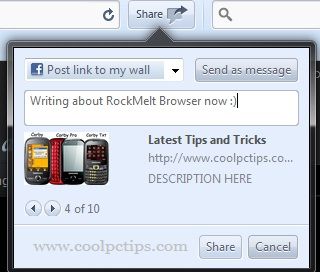
2) Share the current page which you are browsing.This the best thing which i like. We can share any page which we want just with a small share option which comes default with the browser.
3) Find friends and pick favorites. This is a very good option where we can select the best friend and put a star to him. If we again want to see our best favorite friends, you can list them up in to friends toolbar which is simple awesome. Just open the Show all friends and pick favorites panel which is left to the browser and atlast of the friends panel and put a star to a friend whom you think is good.


4) Adding Feeds from our favorite sites. Open new tab and browse to your favorite sites and open the Add Feeds button from the right panel and then click on Enter Url which is at the top and save it. So every time when that site has a update, you will receive a update message.


5) Search and quickly preview the results from Google. This will save the time and makes our work a lot more easy and faster.Just click on search box, enter a term and then a list will be displayed there itself so that you can refer further or click on that to open it.
6) Bookmarks and helps are very useful in this browser. The advance bookmark manager will make our work more simpler without any addons or applications.
And lastly you can invite your friends to use the RockMelt ! browser which is the only way to use the browser for you. This is the fastest way you can use the browser by downloading it from them or else you have to book a slot for using the browser where we have to wait for the browser team to respond and then allow us to use it.
The best part of the browser is that its faster and advanced with beautiful features and looks. Hope you will love this browser. .Also remember that only the members can send the access to there friends to download and access RockMelt browser. Its not as simple as Mozilla or chrome.I will give you a link to download or connect with the browser below.

Useful Websites Of 2010 -Most Unpopular

  1. MathTV.com – Awesome website to learn mathematics with experts advice.
  2. PrivacyDefender – The Easy Way to Control Your Facebook Privacy Settings.
  3. Funphotobox – Add your own pictures in funny,GIF images with default frames.
  4. DiffChecker – A tool that quickly & easily gives the text differences between two blocks of text.
  5. Kurrently – A real-time search engine for Facebook and Twitter.
  6. Logaway – Free Online Password Manager (1 login for 1000′s of sites)
  7. Picknzip – Allow you to download photos from Facebook in a single zip or pdf file.
  8. Boston/BigPicture – New Stories in Photographs.
  9. Ohlife – A Personal Journal.
  10. TuxPaint – A Open Source Drawing Software for Children.
  11. Explania – Watch hundreds of animated explanations, interactive tutorials.
  12. Twithelp – Simple and quick Twitter Help.
  13. Fflick – fflick is movie reviews by you and your friends.
  14. USBFlashCopy – A small Windows utility to back up your flash drives & storage cards.
  15. Flisti -  Create free online polls without signing-up.
  16. Unhearit -  Listen Awesome Songs 24/7 Without Any Non-sense.
  17. Clipconverter – Free Best Online All Media Converter.
  18. Jottle – A Face to Face Chat Without Any Non-sense.
  19. Talkminer – Search inside video lectures and talks.
  20. LearnBoost – A Free and amazing Gradebook.
  21. TinEye – Image Search engine which displays all the information about that image.
  22. Keepaboo – About your child and Capturing memories.
  23. HappyCV -  A Free Online Resume Builder.
  24. Blekko – A Search Engine which uses slashtags to search the results.
  25. Vye Music – All the music you could need. Find it and play it.
  26. MomentGarden -  Create and Share our Child’s Story.
  27. Lockittight – Provides theft recovery assistance for mobile devices.
  28. Findbigmail – Increase your gmail account mail space.
  29. HateVille – Like What Others Hate.
  30. Psykotube – A Video Search Engine Site.
  31. ListFav - Lists out your favorite things in all categories.
  32. 8Tracks – A handcrafted internet radio to share & discover music online mix.
  33. AlertFul – Reminds you of the important events by email.
  34. Failin – Know what your friends and people think of you.
  35. Vsee – High Quality, Low Bandwidth Video Conference.
  36. CForum – A Discussion point to post all your computer related queries.

Get a Short Facebook Profile Link

Hi every one nice to see you we have use this article from our friend website. Today I will tell you something interesting which will make your facebook profile link short. As we all now have a facebook account. It has been big news for everyone to know about what’s new in facebook. Lots of people will show interest in there facebook accounts, that your profile should look and the new profile thumbnail pictures and etc. Some people will also concentrate on there facebook profile link. Actually the profile id of facebook is pretty long with some codes and numbers in it. It will represent your facebook account in the database of facebook. Now facebook gave a opportunity to change your profile id link too. Instead of the long number s and code links which are very ugly to see, can be replaced with any name which you want.
Which means that I can replace my profile id with any name I want, but first it should be available in the database? For example take a look at my friends profile id which is somewhat like this http://www.facebook.com/profile.php?id=100001406160296 as you can see the profile link is very big and looks weird. You can change that link to whatever name you want. That means he can change it to. http://www.facebook.com/Kevin if it is available. Orelse he can go to http://www.facebook.com/KevinEngland. This looks very neat and professional. I have changed my Facebook profile id to http://www.facebook.com/satishcoolpctips which looks neat and relative to my site url. Similarly you can create a short facebook link to your fan pages, apps and etc. To make your facebook link short follow these simple steps.
  1. Login to your facebook Account.
  2. Open This Link http://www.facebook.com/username
  3. You will be redirected to a page.
  4. In that Select your Profile ID and it asks your desired username.
  5. Type the desired username in the given box and check availability.
  6. If it is available then click on confirm.
Before you confirm it, you have to keep some rules in mind.
  1. You can’t change the username once you set it.
  2. You can’t transfer the ownership of a username to another party.
  3. You can’t violate anyone else’s trademark rights.
  4. If you are acquiring a username to sell it in the future (squatting), you will lose it.
  5. Usernames may be reclaimed for other unauthorized usages.
If these things are ok with you then change your username now. This is one type of making a short facebook profile link. If you want to know the second step. Just follow this Links below. This application is called as Memorable Web Address For your Facebook Profile. Follow the same steps which are in step 1. Just click this Link to open the link.

How to cut the images easily in the photoshop without pen tool,magic wand tool and quick selection tool

Hi everybody nice to meet you.We will provide useful tips in photoshop

Many of the peoples i noted they will be using pen tool for cutting their images or something in the photoshop.I am agree with that .The easy way is to cut the images is to holding shift key and cut.Follow the steps below and try it yourself

1)First of all open the image and release the background lock by double clicking that.
2)Then press the Button (Q).
3)Then select the brush tool or press the (B) button.
4)Then hold down the shift key and selet the area u need to cut .
5)Then again press Q after selecting .
6)Then press Ctrl+Shift+I
7)Then refine images and Your image is cutted successfully.

Thanks for vising our website .If u need more information means just post a comment i will contact u as soon as possible

What are the genuine ways of earnings from home?

Its is 100 % true tested ways of earnings from home :-


The Company which pays genuine payments are:-

1)Adbrite

2)Bidvertiser

3)Chitika

4)Adsense

5)Mturk.com

6)Neobux.com

Those who are technical can work in freelancer.com to earn millions of project. And the basis members who do no nothing on the internet and wish to earn from home they can use mturk.com and neobux.com.

Adsense now a days what they are doing.For genuine content website they are disabling accounts and those who are new to adsense is earning good .Adsense is based on the luck.Anything may happen at anytime.Richer man get poor and the poor man get richer.

We know the easy way to earn from adsense and adbrite.Contact me via post message i will contact you soon


Related Posts Plugin for WordPress, Blogger...